Metallic Glitter Photoshop Styles: A Designer's Guide
In the world of digital design, there is a distinct difference between a flat, static image and one that seems to catch the light. That "catch" often comes from texture, specifically the allure of shimmer and shine. This is where Metallic Glitter Photoshop Styles become an indispensable tool for anyone looking to elevate their visual projects without spending hours manually painting gradients or blending modes. These are not just simple filters; they are sophisticated, one-click solutions designed to inject luxury, energy, and depth into your work instantly.
Whether you are a seasoned graphic designer working on high-end packaging or a small business owner creating social media graphics for a holiday sale, the ability to apply realistic metallic textures can transform a good concept into a standout piece. The appeal of these styles lies in their versatility. They mimic the chaotic yet beautiful scattering of real glitter particles, offering a tactile quality that screen-based designs often lack. By using these pre-set assets, you bypass the technical complexity of layering multiple effects, allowing you to focus on composition and creativity.
The Visual Personality of Metallic Textures
When we talk about Metallic Glitter Photoshop Styles, we are discussing more than just a color overlay. We are talking about a specific visual personality that conveys celebration, premium quality, and modern elegance. Unlike a standard solid fill, which can appear dull on digital screens, these styles introduce micro-contrasts and specular highlights that simulate how light interacts with reflective surfaces.
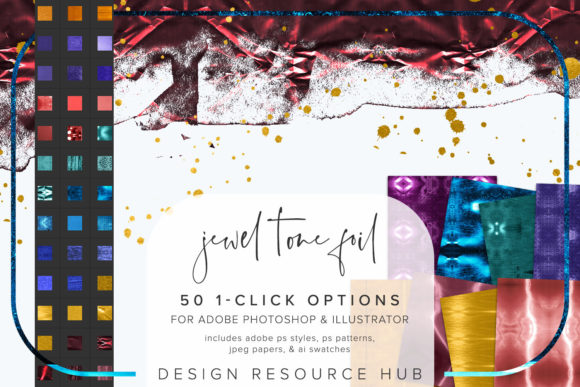
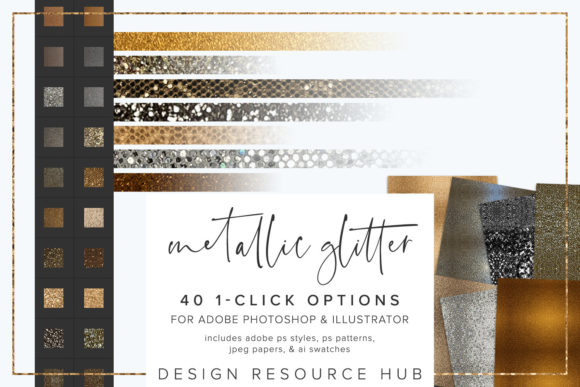
The aesthetic range within this set is broad. You might find cool-toned silvers that feel futuristic and sleek, perfect for tech branding or modern editorial design. Conversely, warm golds and rose golds evoke warmth, tradition, and opulence, making them ideal for wedding invitations, luxury product packaging, or festive marketing campaigns. The texture itself adds a layer of noise and grain that breaks up the perfection of vector shapes, grounding digital elements in a sense of physical reality.
This texture works exceptionally well when applied to typography. Imagine a bold sans serif font used for a headline suddenly gaining a three-dimensional, sparkling finish. It immediately draws the eye, establishing a clear visual hierarchy. Similarly, applying these styles to geometric shapes or borders can frame your content with a sense of occasion. The result is a design that feels polished and intentional, rather than hastily assembled.
Strategic Applications Across Design Disciplines
The true value of Metallic Glitter Photoshop Styles is found in their adaptability across various creative disciplines. In brand identity work, these assets can be used sparingly to highlight key elements like logos or icons, adding a touch of sophistication without overwhelming the core message. For packaging design, simulating foil stamping or glitter varnish digitally allows clients to visualize the final product before committing to expensive printing processes.
In the realm of web design and social media graphics, engagement is king. Users scroll quickly, and a subtle shimmer can stop the thumb mid-scroll. A call-to-action button with a metallic gradient or a promotional banner featuring glitter accents stands out against the sea of flat, matte colors that dominate many feeds. This is particularly effective for seasonal campaigns, product launches, or events where excitement needs to be communicated visually.
For publishers and editors working on editorial design, these styles offer a way to break the monotony of text-heavy layouts. Applying a metallic style to chapter headings or pull quotes can create a focal point that guides the reader through the narrative. Even in personal projects, such as scrapbooking or hobbyist crafts, these digital assets allow for professional-looking results that rival traditional hand-crafted techniques.
What’s Included in the Asset Pack
To ensure maximum flexibility, this collection provides a comprehensive suite of files compatible with both Adobe Photoshop and Adobe Illustrator. Understanding what you are getting helps you integrate these tools into your workflow seamlessly.
- Adobe Photoshop .asl file: This contains the actual one-click styles. Once installed, these appear in your Styles panel, ready to be dragged onto any layer.
- Adobe Photoshop .pat file: These are seamless patterns derived from the glitter textures. You can use them to fill large areas or create custom brushes.
- Adobe Illustrator .ai swatch file: For vector users, this ensures consistency across platforms. You can apply the exact same color and texture logic to paths and type in Illustrator.
- JPEG paper files: High-resolution 10 x 10-inch images that serve as background textures or reference materials for composite work.
This variety means you aren't locked into a single application. If you start a project in Illustrator for logo design, you can easily transition to Photoshop for the final rendering, maintaining the integrity of the metallic effect throughout.
Installation and Workflow Integration
One of the biggest barriers to using advanced textures is the time it takes to set them up. Fortunately, the installation process for Metallic Glitter Photoshop Styles is straightforward and designed for speed.
- Importing Styles: Open Photoshop, navigate to the Styles panel, click the menu icon, and select "Import Styles." Browse to your downloaded .asl file. Suddenly, your palette is filled with new options.
- Loading Patterns: Go to Edit > Presets > Preset Manager (or simply double-click the pattern thumbnail in the Fill/Stroke dialog) and load the .pat file. Now you have seamless backgrounds at your fingertips.
- Setting Up Illustrator Swatches: In Illustrator, open the Swatches panel, go to Window > Swatch Libraries > Other Library, and locate the .ai file. Your metallic colors are now available for vector fills.
Once installed, the workflow becomes fluid. You can change the scale of the patterning for different applications, ensuring that a large poster has a different density of glitter compared to a small business card. You can also combine these styles with custom brushes to add hand-drawn accents that share the same metallic sheen, creating a cohesive look.
Evaluating Fit and Professional Usage
While the ease of use is tempting, professional designers know that restraint is key. Metallic effects can easily tip from "elegant" to "tacky" if overused. When choosing whether to incorporate Metallic Glitter Photoshop Styles into a project, consider the brand voice. Is the brand playful and energetic? Or is it understated and corporate? A heavy-handed application of glitter might clash with a minimalist aesthetic but would be perfect for a lifestyle brand targeting a younger demographic.
Readability is another crucial factor. When applying these styles to text, always check the contrast ratio. While a thick, bold display font handles texture beautifully, thin serif fonts or small body text can become illegible if the glitter pattern disrupts the letterforms too much. Test your pairings by zooming out to 50% or 75% to see how the design holds up at a distance.
Finally, remember that these are design assets meant to enhance your unique vision, not replace it. Use them to solve problems—adding depth to a flat layout, highlighting a sale price, or giving a logo a premium feel. By understanding the mechanics of the tool and the psychology of the texture, you can leverage Metallic Glitter Photoshop Styles to create work that is not only visually stunning but also strategically sound.